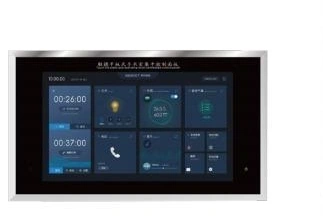
32-inch touchscreen panel
Operating Room Fixtures
Operating Room Control Panel
| Specification | Touchscreen | Six-function panel |
|---|---|---|
| Brand | shengtongJH | |
| User interface | 32-inch LCD touchscreen | Dedicated clock, timer and control sections |
| Panel size configuration (mm) | Custom enclosure for selected 32-inch screen and wall opening | 640 × 640 × 110 |
| Timing | Clock, procedure elapsed time and anesthesia elapsed time options | |
| Environment display | Temperature / humidity; pressure display if sensors are included | |
| System interfaces | Lighting, HVAC status, gas alarms and communications as specified | |
| Mounting | Recessed wall panel; accessible rear services | |
| Customization | Displayed functions, labels, interfaces and enclosure | |
Dimensions and configurations can be customized for your application.
Make room status and frequently used controls accessible from a central wall position, using a touchscreen or a dedicated multi-function panel.
Choose a control layout staff can read at a glance
A central panel reduces the need to look at several separate wall devices for routine room information. The useful functions depend on the operating-room workflow: a clock, independent elapsed timers, lighting controls and selected environmental readings may all need different prominence.
A touchscreen can present more information within one surface. A dedicated multi-function panel keeps recurring values and controls in fixed positions. Select the arrangement around the people using it, including their viewing distance, gloves and the need to distinguish a timer from an alarm.
A displayed value must have a defined source
Sensors and systems
Temperature, humidity, pressure and gas status come from connected devices. Specify which system supplies each value, the signal interface and what happens when communication is lost. A number on a screen is useful only when its meaning and source are clear.
Commands and feedback
A lighting or HVAC button may issue a command without proving the equipment responded. Where operational confirmation matters, provide appropriate feedback and distinguish requested state from actual state.
Keep critical functions independent where required
The integration panel should not inadvertently remove the local safety, alarm or manual controls required by the connected systems. Define which functions continue during a display or communication fault. Clinical equipment, gas-system alarms and building controls require their own appropriate design and commissioning.
Before installation, coordinate the backbox, wiring, network requirements and service access. During handover, verify the function labels, timers, sensor readings and each connected command with the relevant system specialist. Interface layout, control functions and enclosure dimensions can be customized to the operating-room systems actually provided.